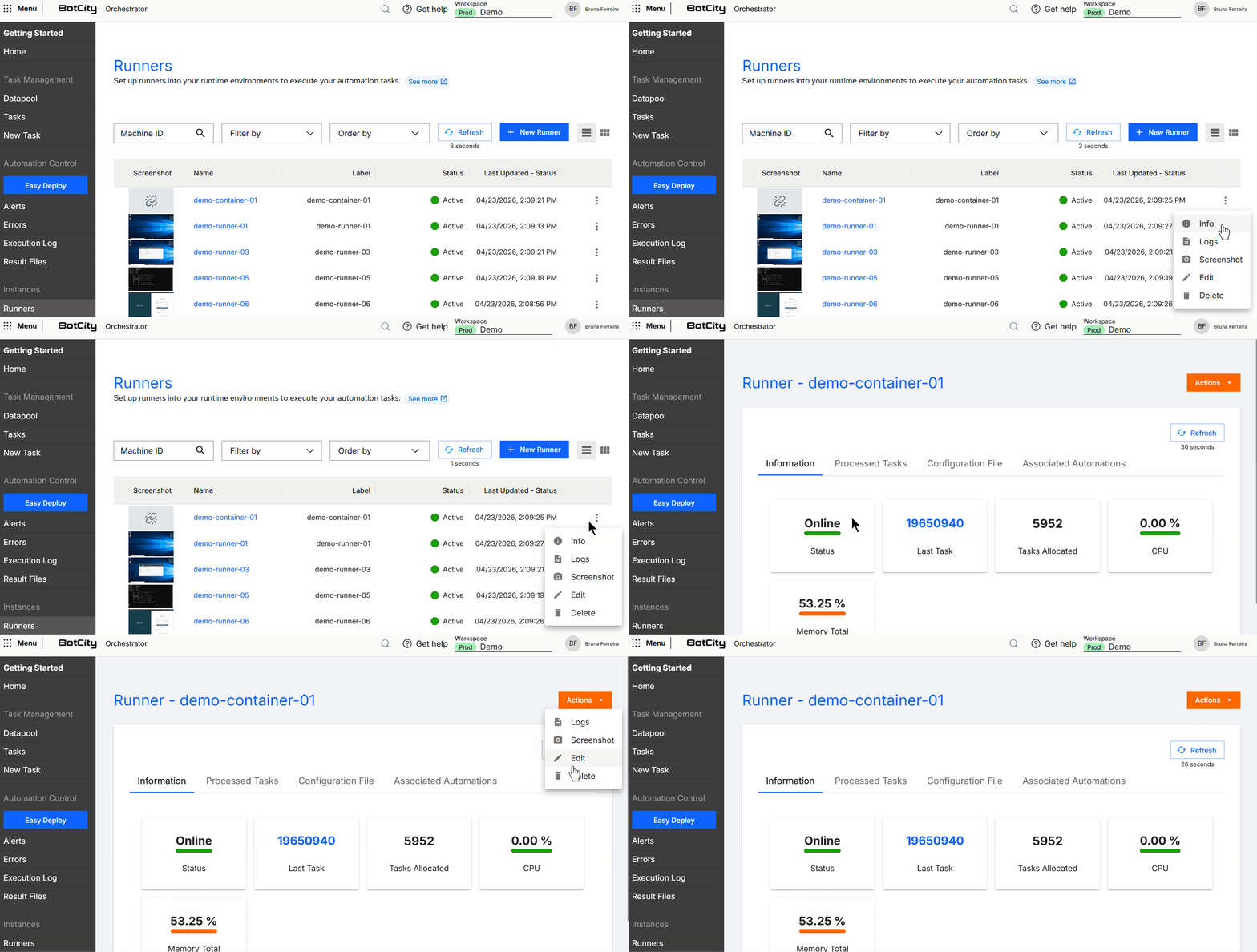
Runners
Runners are services started in execution environments that connect to the BotCity Orchestrator. They can be installed on physical machines, virtual machines, or containers and their function is to execute automation tasks.
When accessing the side menu, you can view general information about execution environments and monitor task processing.
How it works
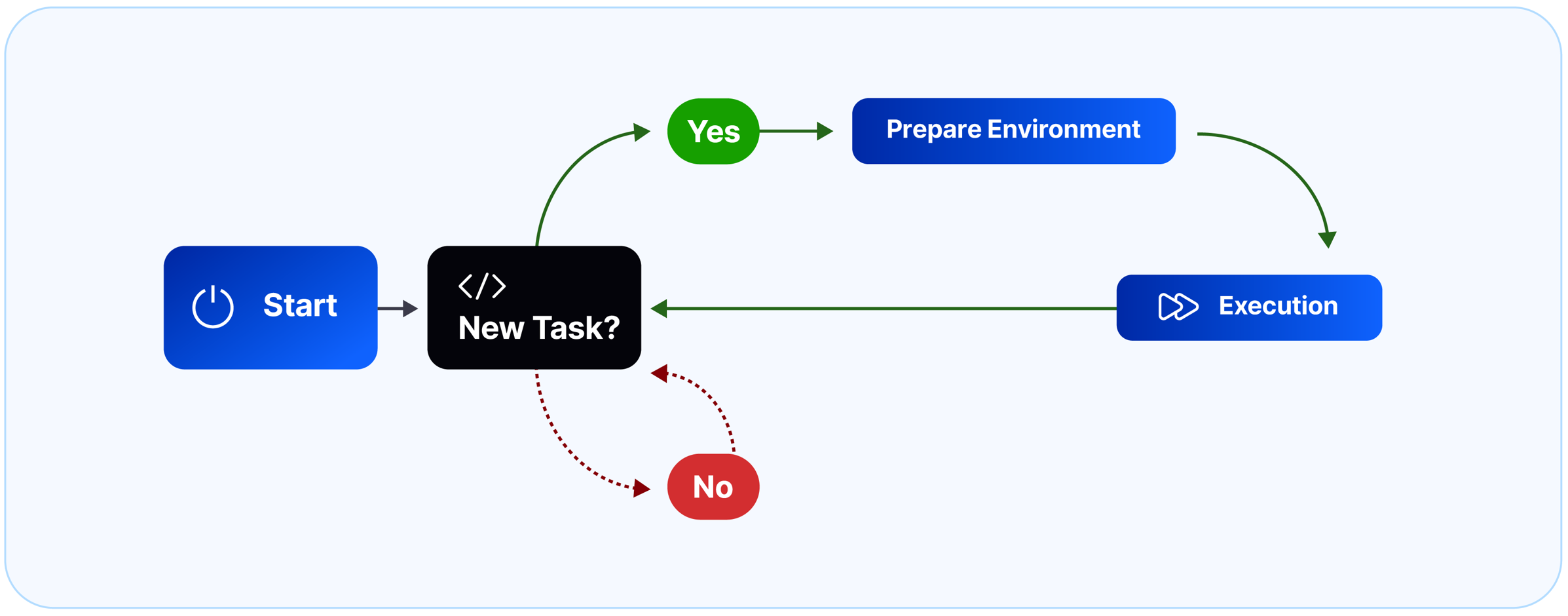
The basic flow of a Runner, after the installation process, is as follows:
- Initialization and authentication with the BotCity Orchestrator
- Identification of pending tasks
- Download of robots
(on first run or when there is an update) - Creation of isolated environments for each automation
(on first run or when there is an update) - Installation of automation dependencies
(on first run or when there is an update) - Task execution
Runners can execute tasks of different types of automations, from those requiring direct interaction with the user graphical interface (such as desktop applications, ERPs, and operating systems), to automations that work without a graphical interface, such as headless web, crawlers, and API integrations.
Execution Parallelism
Each Runner executes a single task at a time, but you can install multiple Runners in the same execution environment, enabling execution parallelism and greater throughput of the pending task queue.
Some care should be taken when allocating Runners in the same environment:
- Automations that depend on screen resource manipulation should not run in parallel, as there will be resource contention, leading the process to fail. The ideal approach is to run an automation that uses this type of resource in parallel with background automations.
- There is no limit to the number of Runners allocated in a single execution environment, but the type of process and the available resources on the machine (RAM, CPU, etc.) to process tasks in parallel should be considered.
Create Runner in the Orchestrator
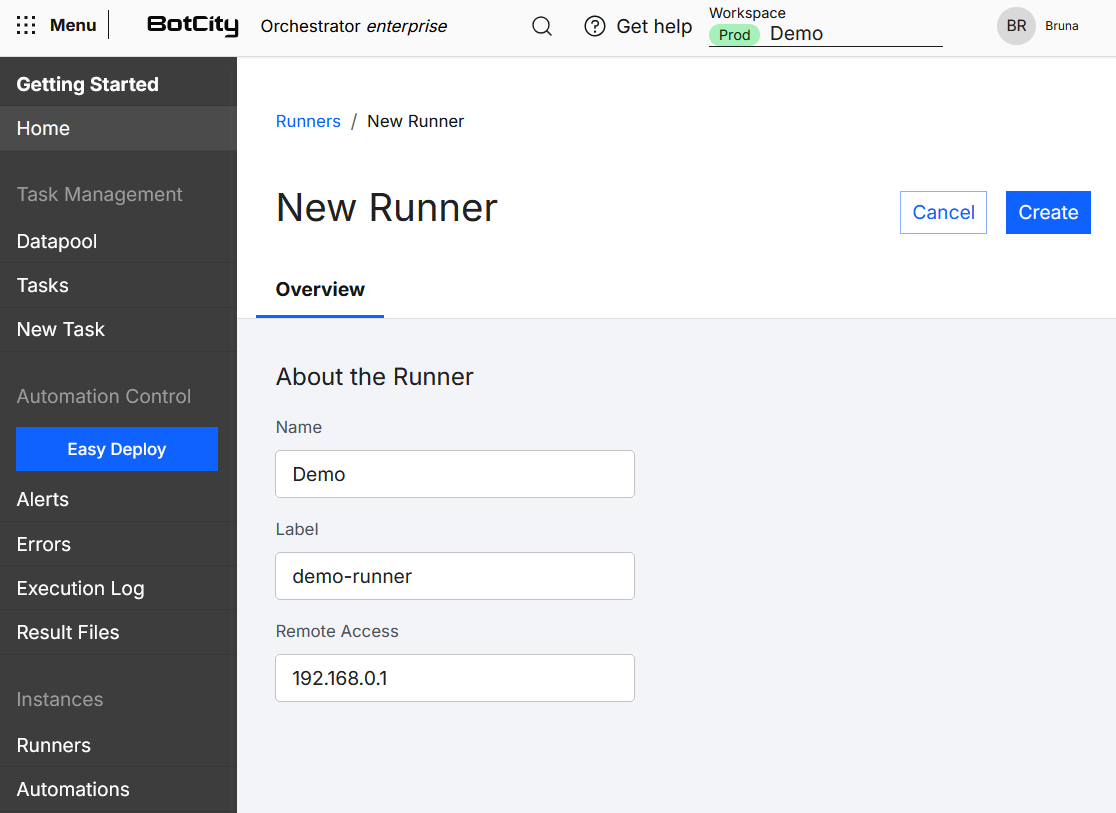
When accessing the Runners side menu, click the + New Runner button in the top right corner and fill in the following information:
- Name: Friendly name for the Runner.
- Label: Unique identifier for the Runner.
- Remote Access:
optionalIP of the environment where it was installed.
Finish by clicking the Create button in the top right corner.
The next step is to configure the Runner in the execution environment.
Configure Runner
Runner allocation and configuration should be done directly in the execution environments.
See more at:
Start Runner in the Environment
After configuration is complete, you can start the Runner service in different ways:
Runner Views
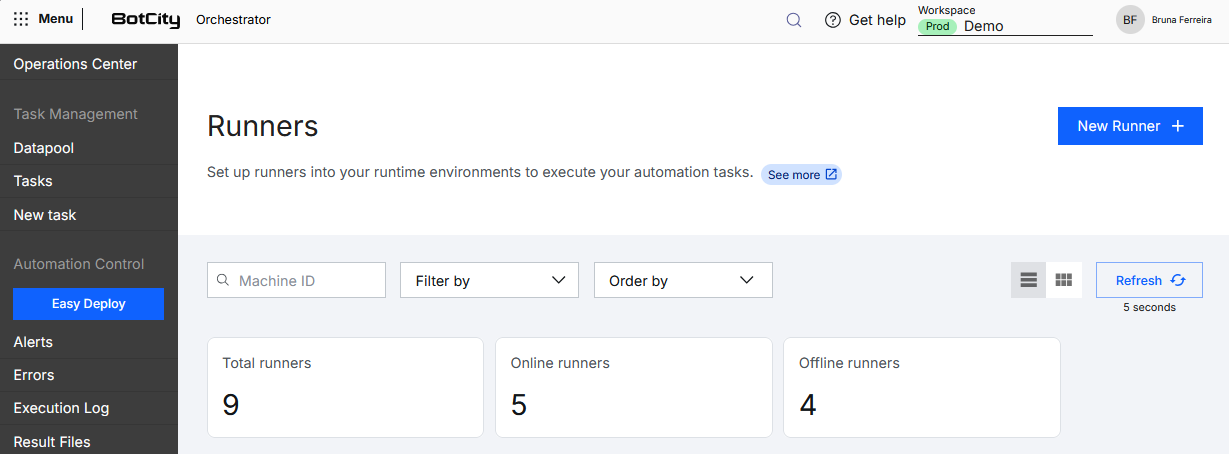
On this screen, you can view a summary of the Runners in the following cards:
- Total Runners: the total number of Runners created.
- Online Runners: the number of Runners available for execution.
- Offline Runners: the number of Runners unavailable for execution.
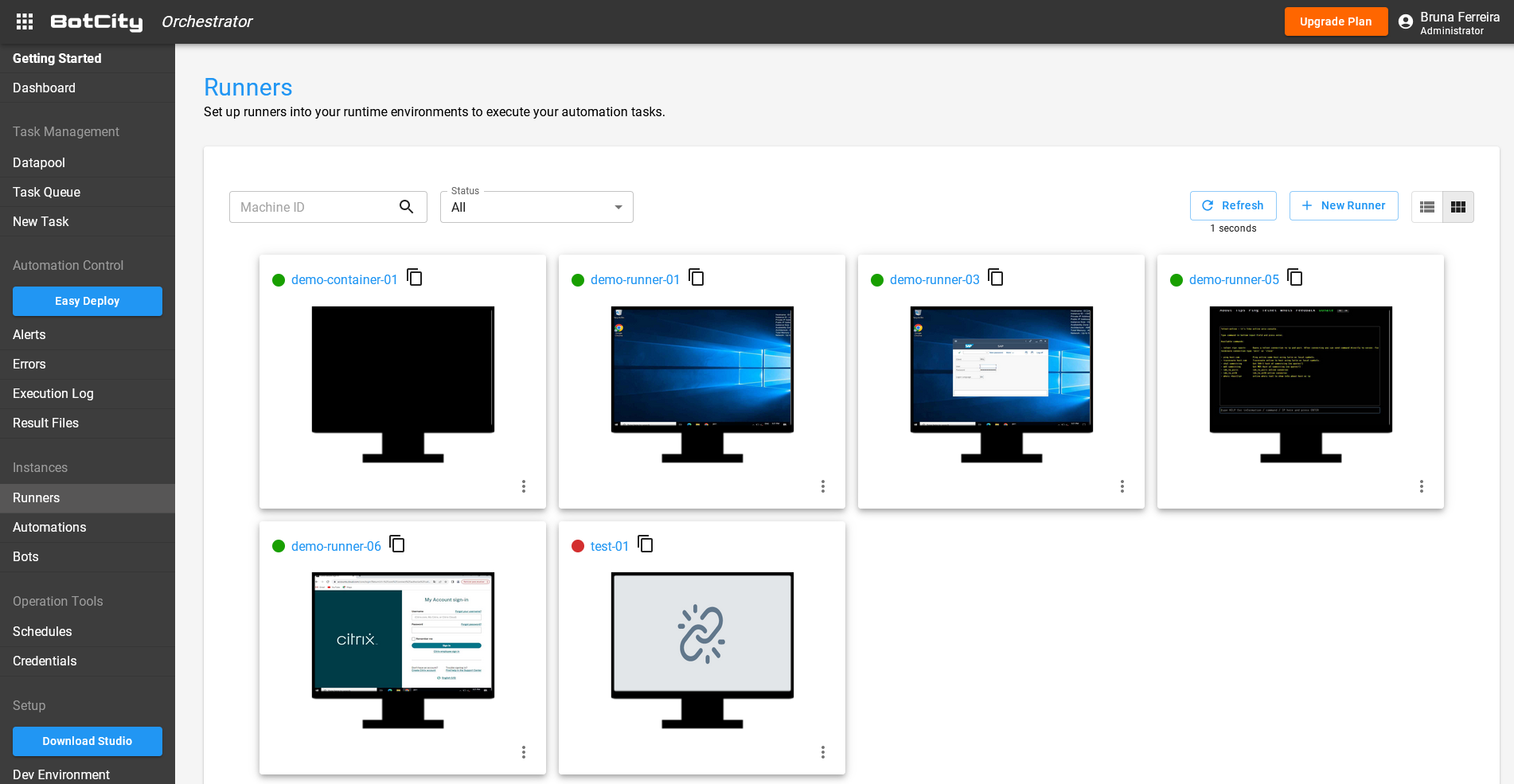
You can choose to view the Runners in either card or list format.
Cards
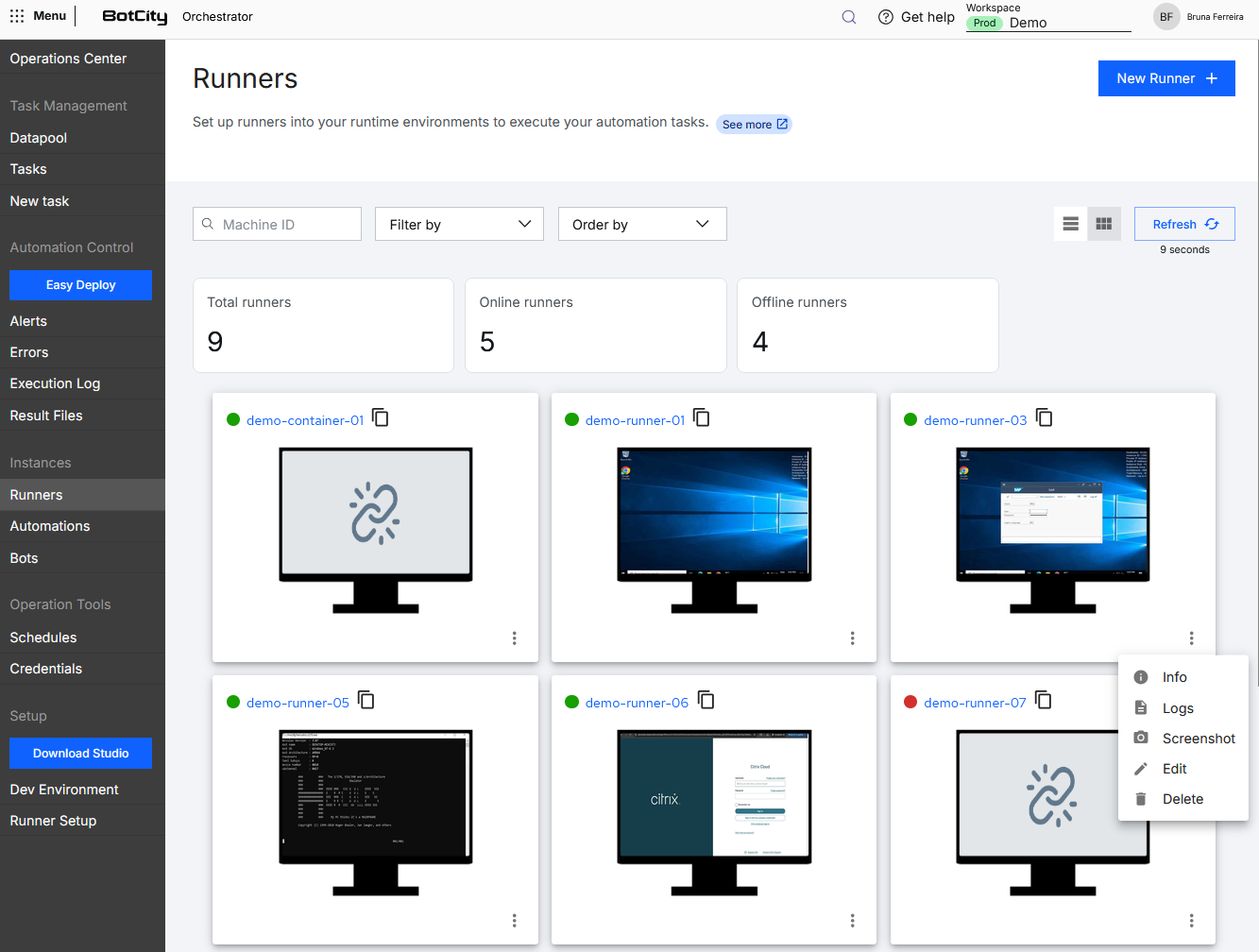
In this format, each Runner is displayed in an individual card, showing essential information such as:
- Status:
- Active
- Inactive
- Label: Runner identification as a link to access details
- Screen preview: Returns the screen of the environment where it was installed every 1 minute
(when configured and active) - Actions button:
- Info: Detailed information about the Runner.
- Logs: Tracking of automation execution logs.
- Screenshot: Downloads the current screenshot.
- Edit: Updates information about this Runner.
- Delete: Removes this Runner instance from the BotCity Orchestrator.
List
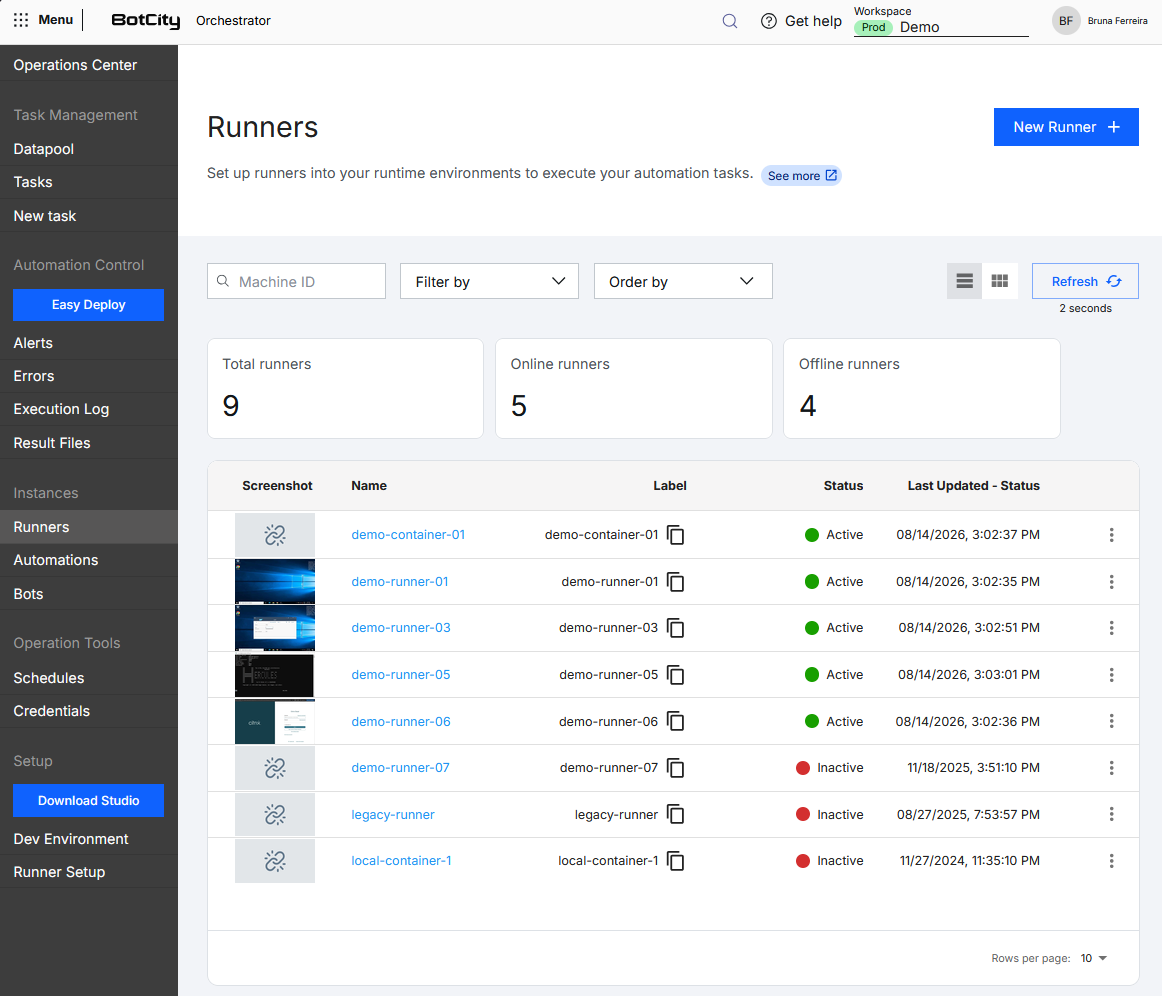
In this format, Runners are displayed in a table, allowing a column-based view of information:
- Screenshot: Returns the screen of the environment where it was installed every 1 minute
(when configured and active) - Name: Friendly identification name of the Runner as a link to access details
- Label: Unique Runner identification
- Status:
- Active
- Inactive
- Last Update - Status: Date and time of the last Runner communication with the Orchestrator.
- Actions button:
- Info: Detailed information about the Runner.
- Logs: Tracking of automation execution logs.
- Screenshot: Downloads the current screenshot.
- Edit: Updates information about this Runner.
- Delete: Removes this Runner instance from the BotCity Orchestrator.
Search and filters
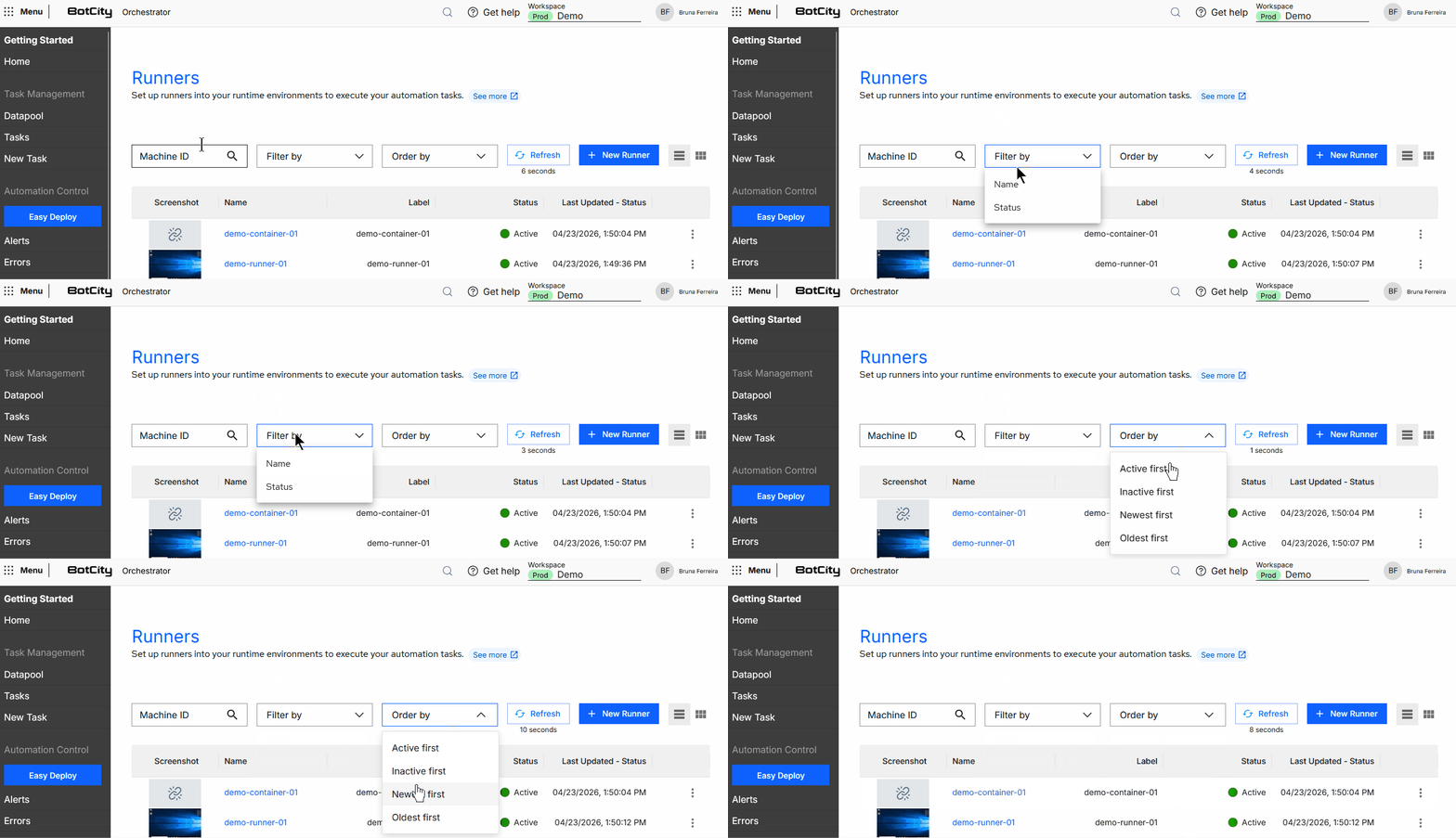
You can combine several filters at the top of the Runners menu to search according to your needs.
Search by:
- Machine ID: Search by the unique Runner identifier.
Available filters:
- Name: Search and select one or more Runners.
- Status: Select the Runner status
Online|Offline
Sort by:
- Active first
- Inactive first
- Most recent first
- Oldest first
Runner Details
You can access Runner details in the following tabs:
Information Tab
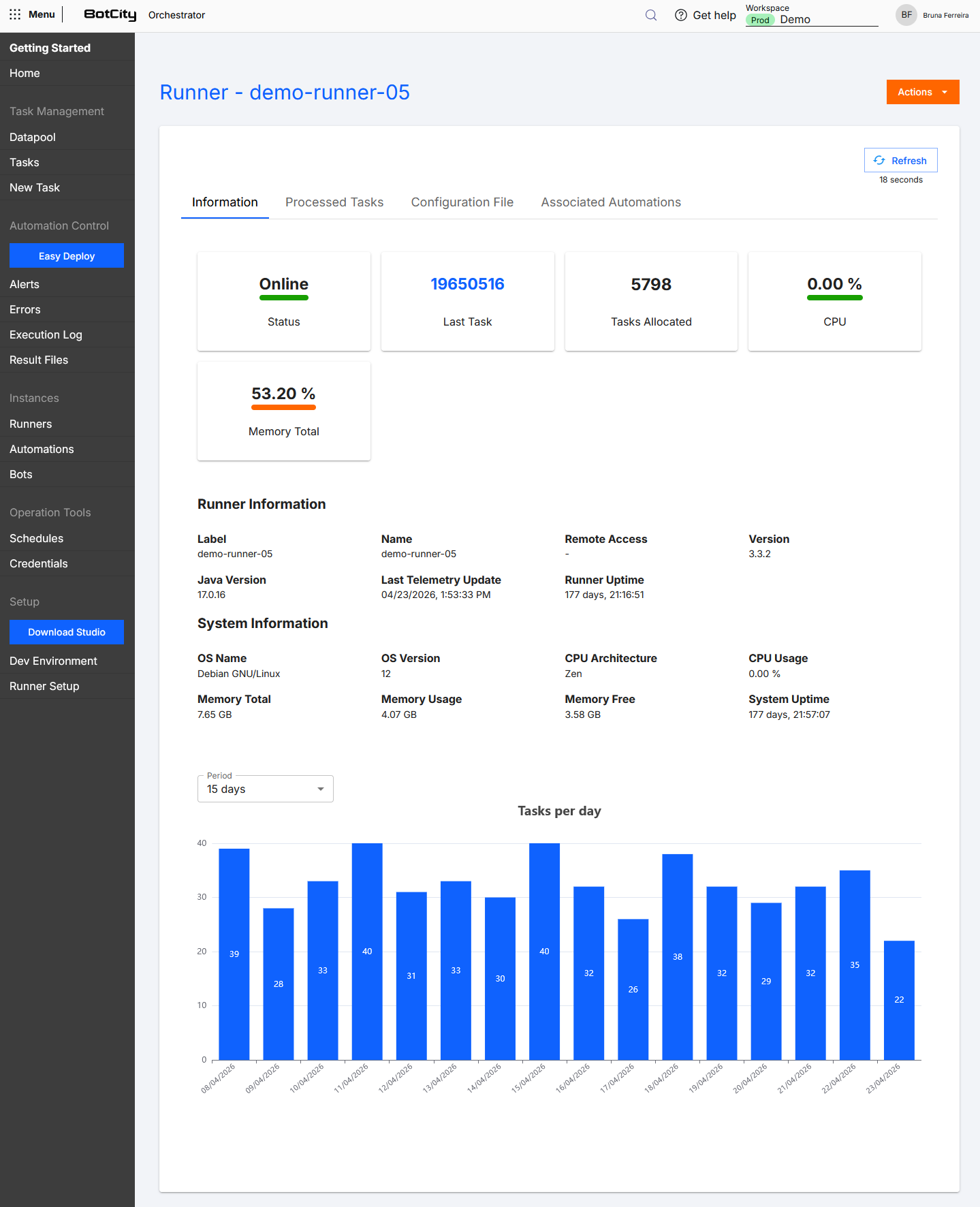
General Runner Information
- Status: Indicates the current status of the Runner, that is, whether it is
onlineoroffline. - Last Task: ID of the last executed task.
- Allocated Tasks: Indicates the number of automations allocated to this Runner.
- CPU: Indicates CPU utilization of the machine where the Runner is allocated.
- Memory: Total machine memory in
%.
Telemetry
By default, telemetry information is not collected by the Runner. If you want this information to be sent to the Orchestrator, include an additional configuration.
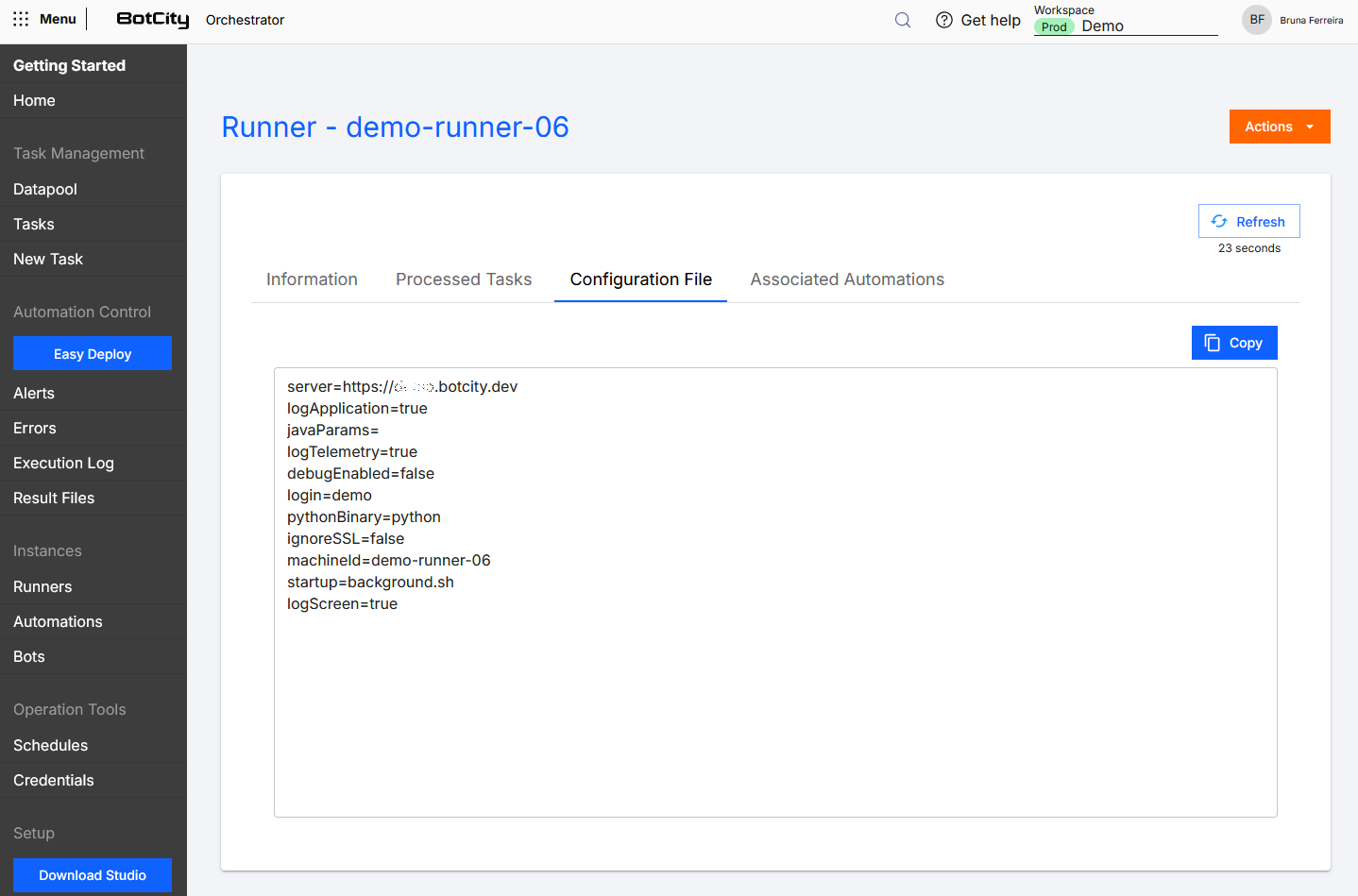
In the conf.bcf file located in the conf folder of the SDK, set the logTelemetry=true configuration.
You can view the available configuration parameters at Customizing Runner Configuration.
Runner Information
- Label: Runner identification.
- Name: Runner name.
- Remote Access: Information about remote access.
- Version: Version of the Runner being used.
- Java Version: Version of Java installed on the machine where the Runner is allocated.
- Last Telemetry Update: Date and time of the last telemetry update.
- Runner Uptime: The time the Runner has been or is active.
System Information
- OS Name: Name of the operating system of the machine where the Runner is allocated.
- OS Version: Version of the operating system of the machine where the Runner is allocated.
- CPU Architecture: Shows the CPU architecture.
- CPU Usage: Indicates the CPU usage percentage.
- Memory: Total system memory.
- Used Memory: Total memory in use.
- Free Memory: Total free memory.
- System Uptime: The time the system has been active.
Graph - Tasks per day
In addition to all this information, you can also monitor a graph of tasks executed by the Runner over specific periods: last week, last 15 days, and last month.
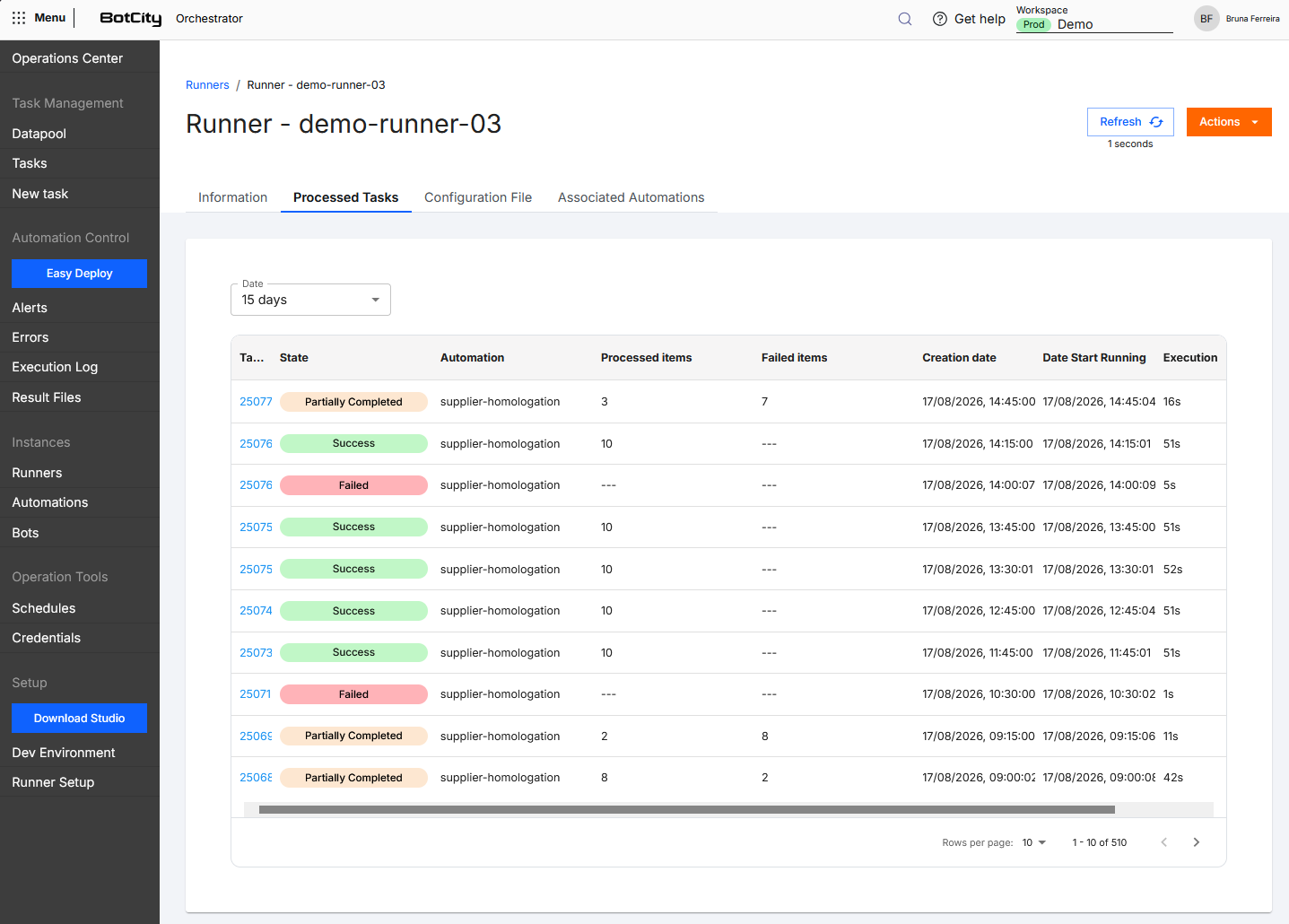
Processed Tasks Tab
Shows the list of tasks processed only by this Runner.
Configuration File Tab
Shows the content of the conf.bcf file, which defines the Runner's settings.
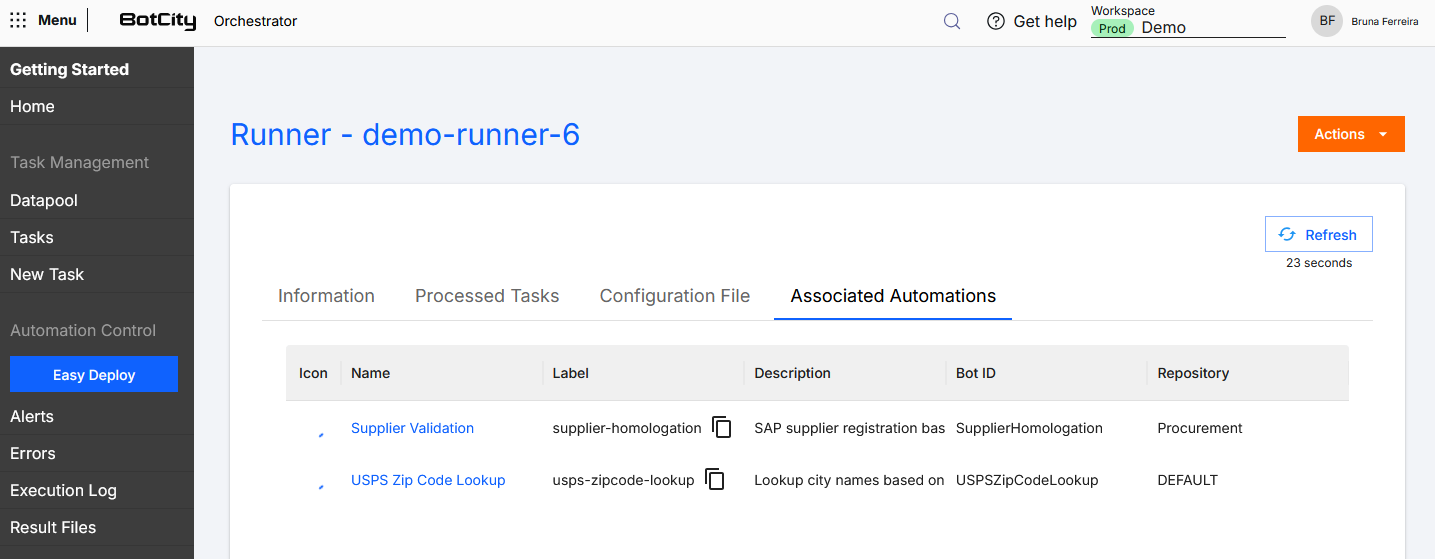
Associated Automations Tab
Shows the list of all automations associated with this Runner.
Actions Button
You can access the available actions via the actions menu on the Runners screen or by accessing a Runner's details and clicking the Actions button.
The available actions are:
- Info: Detailed information about the Runner.
- Logs: Access to the Runner's detailed execution log.
- Screenshot: Downloads the current screenshot.
- Edit: Updates the Runner's
NameandRemote accessinformation. - Delete: Removes this Runner instance from the BotCity Orchestrator.